Tested Deployments
Abstact
This guide provides the tested deployments of Ansible for OpenShift Virtualization Migration
Overview
The Ansible for OpenShift Virtualization Migration team tested a defined set of deployment options. These deployments are tested against expected production deployments. It is possible to run Ansible for OpenShift Virtualization Migration using different infrastructure topologies.
Multi-cluster Deployment
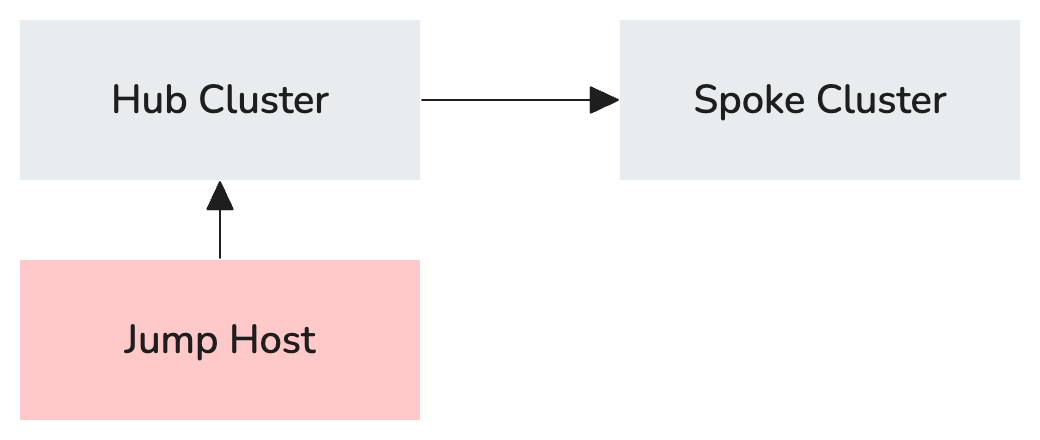
Multi-cluster deployments consist of a central "hub" cluster and one or more "spoke" clusters.
Example Inventory File
---
# OpenShift Virtualization Migration Ansible Inventory

all:
  vars:

    # Baseline Variables
    aap_execution_environment: OpenShift Virtualization Migration
    aap_execution_environment_image: quay.io/redhat-cop/openshift-virtualization-migration-ee:latest
    aap_project: OpenShift Virtualization Migration
    aap_org_name: OpenShift Virtualization Migration
    aap_namespace: virtualization-migration
    aap_version: 2.6
    aap_channel: stable-2.6
    aap_instance_name: 'aap'
    aap_validate_certs: false
    controller_validate_certs: false

    # If secure_logging is set to 'true', Secrets may be displayed in logs.
    # secure_logging: false

    ## Operators to deploy on the OpenShift Hub Cluster
    # aap_seed_operator_management_hub: []
    ## Operators to deploy on the OpenShift Spoke Clusters
    # aap_seed_operator_management_spoke: []

    # Red Hat account login used to attach AAP subscription
    rh_username: changeme
    rh_password: changeme

    # Container registry vars
    # This is the location of the hosted execution environment
    container_host: changeme # e.g. 'quay.io/example'
    container_username: changeme
    container_password: changeme
    container_verify_ssl: false

    # Git Variables
    ## Configure and uncomment as needed

    ## AAP Project Configuration (repository URL and branch)
    aap_project_repo: changeme
    aap_project_branch: main

    ## Git Credentials
    git_username: changeme
    git_password: changeme
    # git_ssh_private_key:
    # git_ssh_key_passphrase:

    # Automation Hub Variables
    automation_hub_certified_url: https://cloud.redhat.com/api/automation-hub/content/published/
    automation_hub_certified_auth_url: https://sso.redhat.com/auth/realms/redhat-external/protocol/openid-connect/token
    automation_hub_certified_token: changeme

    automation_hub_validated_url: https://cloud.redhat.com/api/automation-hub/content/validated/
    automation_hub_validated_auth_url: https://sso.redhat.com/auth/realms/redhat-external/protocol/openid-connect/token
    automation_hub_validated_token: changeme

# Migration Factory Hub cluster to configure
migration_hub:
  hosts:
    # Friendly name of the Hub
    hub.cluster.example.com:
      # Host Variables

      # OpenShift Variables for the Hub
      # You must only define one set of openshift credentials. EITHER
      # openshift_username + openshift_password; OR openshift_temporary_api_key OR openshift_api_key
      openshift_host: changeme # e.g. 'https://api.example.com:6443'
      # openshift_temporary_api_key: # This is a 24 hour API key generated when you select your login
      # in the OpenShift UI or use `oc login`. If a this var is not provided, it is expected that you
      # provide either openshift_username + openshift_password (used to generate a temporary api key)
      # or openshift_api_key with a permanent SA API key
      # openshift_api_key: # This is a permanent Service Account API key. If you don't have a Service
      # Account, one can be generated if you provide a tempoarary api key via openshift_temporary_api_key,
      # or if you provide openshift_username + openshift_password to generate a temporary api key for you.
      # openshift_username: # If no openshift_temporary_api_key or openshift_api_key are provided,
      # then openshift_username + openshift_password can generate one for you
      # openshift_password: # If no openshift_temporary_api_key or openshift_api_key are provided,
      # then openshift_username + openshift_password can generate one for you
      openshift_verify_ssl: false


# Migration Factory Hub spokes to configure
migration_spoke:
  hosts:
    # Friendly name of the Spoke
    spoke.cluster.example.com:
      # Host Variables

      # OpenShift Variables for the Spoke
      # You must only define one set of openshift credentials. EITHER openshift_username + openshift_password;
      # OR openshift_temporary_api_key OR openshift_api_key
      openshift_host: changeme # e.g. 'https://api.example.com:6443'
      # openshift_temporary_api_key: # This is a 24 hour API key generated when you select your login in the
      # OpenShift UI or use `oc login`. If a this var is not provided, it is expected that you provide either
      # openshift_username + openshift_password (used to generate a temporary api key) or openshift_api_key with
      # a permanent SA API key
      # openshift_api_key: # This is a permanent Service Account API key. If you don't have a Service Account,
      # one can be generated if you provide a tempoarary api key via openshift_temporary_api_key, or if you provide
      # openshift_username + openshift_password to generate a temporary api key for you.
      # openshift_username: # If no openshift_temporary_api_key or openshift_api_key are provided, then
      # openshift_username + openshift_password can generate one for you
      # openshift_password: # If no openshift_temporary_api_key or openshift_api_key are provided, then
      # openshift_username + openshift_password can generate one for you
      openshift_verify_ssl: false

      # List of migration targets to configure on this specific spoke cluster
      configured_migration_targets:
        - vmware-target-1

      # Variables to apply to all configured job templates
      aap_job_template_extra_vars:

  ## Group Variables to apply to all spokes
  vars:
    migration_targets:

      ## Data Structure of Migration Targets
      # - name: vmware-target-1 # Required
      #   type: vmware # Must be `vmware`
      #   host: vcenter.example.com
      #   sdkEndpoint: /sdk # Defaults to this value if not provided
      #   username: <username>
      #   password: <password>
      #   certificate: |
      #     <certificate>
      #   insecureSkipTlsVerify: <value> # defaults to `true` if not specified
      #   credentialsSecretRef: <reference> # Namespaced name (<namespace>/<name>) or just <name> if in
      #     <mtv_namespace> containing MTV provider details
      #   nmstate: <configurations applied as merged extra variables to the job template to configure networking>
      #   mapping: <configurations applied as merged extra variables to the job template to configure MTV mapping
      #     storage and networking>

      ## Example Migration Target (uncomment to use as a baseline)
      #  - name: vmware-2w7dj
      #    type: vmware
      #    host: vcsrs00-vc.infra.demo.redhat.com
      #    username: ocpvirt-2w7dj-user1@infra
      #    password: r9F37-f6MMepF7
      #    vddk:
      #      image: quay.io/redhat-cop/openshift-virtualization-migration-vddk:latest
      #      username: "{{ container_username }}"
      #      password: "{{ container_password }}"
      #    sdkEndpoint: /sdk
      #    insecureSkipTlsVerify: true
      #    mapping:
      #      create: true
...
Multi-cluster with External AAP
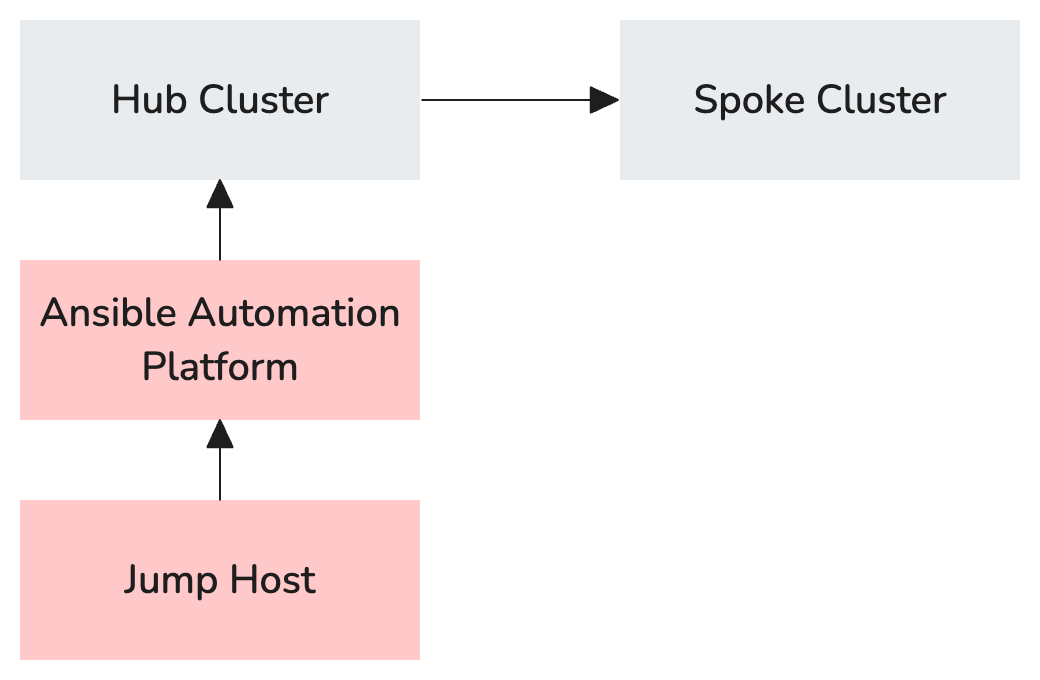
Multi-cluster with External AAP deployments have the same "hub" and "spoke" clusters as Multi-cluster Deployment. Instead of deploying AAP on the "hub" cluster, a pre-exsiting APP installation is used.
Example Inventory File
---
# OpenShift Virtualization Migration Ansible Inventory

all:
  vars:

    # Baseline Variables
    aap_execution_environment: OpenShift Virtualization Migration
    aap_execution_environment_image: quay.io/redhat-cop/openshift-virtualization-migration-ee:latest
    aap_project: OpenShift Virtualization Migration
    aap_org_name: OpenShift Virtualization Migration
    aap_namespace: virtualization-migration
    aap_version: 2.6
    aap_channel: stable-2.6
    aap_instance_name: 'aap'
    aap_validate_certs: false
    controller_validate_certs: false

    # If secure_logging is set to 'true', Secrets may be displayed in logs.
    # secure_logging: false

    ## Operators to deploy on the OpenShift Hub Cluster
    # aap_seed_operator_management_hub: []
    ## Operators to deploy on the OpenShift Spoke Clusters
    # aap_seed_operator_management_spoke: []

    # Red Hat account login used to attach AAP subscription
    rh_username: changeme
    rh_password: changeme

    # Container registry vars
    # This is the location of the hosted execution environment
    container_host: changeme # e.g. 'quay.io/example'
    container_username: changeme
    container_password: changeme
    container_verify_ssl: false

    # Git Variables
    ## Configure and uncomment as needed

    ## AAP Project Configuration (repository URL and branch)
    aap_project_repo: changeme
    aap_project_branch: main

    ## Git Credentials
    git_username: changeme
    git_password: changeme
    # git_ssh_private_key:
    # git_ssh_key_passphrase:

    # Automation Hub Variables
    automation_hub_certified_url: https://cloud.redhat.com/api/automation-hub/content/published/
    automation_hub_certified_auth_url: https://sso.redhat.com/auth/realms/redhat-external/protocol/openid-connect/token
    automation_hub_certified_token: changeme

    automation_hub_validated_url: https://cloud.redhat.com/api/automation-hub/content/validated/
    automation_hub_validated_auth_url: https://sso.redhat.com/auth/realms/redhat-external/protocol/openid-connect/token
    automation_hub_validated_token: changeme

# OpenShift Virtualization Migration Inventory Groups

migration_aap:
  hosts:
    aap_host:
      aap_username: changeme
      aap_password: changeme
      aap_token: token
      aap_hostname: aap.example.com
      aap_validate_certs: true


# Migration Factory Hub cluster to configure
migration_hub:
  hosts:
    # Friendly name of the Hub
    hub.cluster.example.com:
      # Host Variables

      # OpenShift Variables for the Hub
      # You must only define one set of openshift credentials. EITHER
      # openshift_username + openshift_password; OR openshift_temporary_api_key OR openshift_api_key
      openshift_host: changeme # e.g. 'https://api.example.com:6443'
      # openshift_temporary_api_key: # This is a 24 hour API key generated when you select your login
      # in the OpenShift UI or use `oc login`. If a this var is not provided, it is expected that you
      # provide either openshift_username + openshift_password (used to generate a temporary api key)
      # or openshift_api_key with a permanent SA API key
      # openshift_api_key: # This is a permanent Service Account API key. If you don't have a Service
      # Account, one can be generated if you provide a tempoarary api key via openshift_temporary_api_key,
      # or if you provide openshift_username + openshift_password to generate a temporary api key for you.
      # openshift_username: # If no openshift_temporary_api_key or openshift_api_key are provided,
      # then openshift_username + openshift_password can generate one for you
      # openshift_password: # If no openshift_temporary_api_key or openshift_api_key are provided,
      # then openshift_username + openshift_password can generate one for you
      openshift_verify_ssl: false

      install_aap: false

# Migration Factory Hub spokes to configure
migration_spoke:
  hosts:
    # Friendly name of the Spoke
    spoke.cluster.example.com:
      # Host Variables

      # OpenShift Variables for the Spoke
      # You must only define one set of openshift credentials. EITHER openshift_username + openshift_password;
      # OR openshift_temporary_api_key OR openshift_api_key
      openshift_host: changeme # e.g. 'https://api.example.com:6443'
      # openshift_temporary_api_key: # This is a 24 hour API key generated when you select your login in the
      # OpenShift UI or use `oc login`. If a this var is not provided, it is expected that you provide either
      # openshift_username + openshift_password (used to generate a temporary api key) or openshift_api_key with
      # a permanent SA API key
      # openshift_api_key: # This is a permanent Service Account API key. If you don't have a Service Account,
      # one can be generated if you provide a tempoarary api key via openshift_temporary_api_key, or if you provide
      # openshift_username + openshift_password to generate a temporary api key for you.
      # openshift_username: # If no openshift_temporary_api_key or openshift_api_key are provided, then
      # openshift_username + openshift_password can generate one for you
      # openshift_password: # If no openshift_temporary_api_key or openshift_api_key are provided, then
      # openshift_username + openshift_password can generate one for you
      openshift_verify_ssl: false

      # List of migration targets to configure on this specific spoke cluster
      configured_migration_targets:
        - vmware-target-1

      # Variables to apply to all configured job templates
      aap_job_template_extra_vars:

  ## Group Variables to apply to all spokes
  vars:
    migration_targets:

      ## Data Structure of Migration Targets
      # - name: vmware-target-1 # Required
      #   type: vmware # Must be `vmware`
      #   host: vcenter.example.com
      #   sdkEndpoint: /sdk # Defaults to this value if not provided
      #   username: <username>
      #   password: <password>
      #   certificate: |
      #     <certificate>
      #   insecureSkipTlsVerify: <value> # defaults to `true` if not specified
      #   credentialsSecretRef: <reference> # Namespaced name (<namespace>/<name>) or just <name> if in
      #     <mtv_namespace> containing MTV provider details
      #   nmstate: <configurations applied as merged extra variables to the job template to configure networking>
      #   mapping: <configurations applied as merged extra variables to the job template to configure MTV mapping
      #     storage and networking>

      ## Example Migration Target (uncomment to use as a baseline)
      #  - name: vmware-2w7dj
      #    type: vmware
      #    host: vcsrs00-vc.infra.demo.redhat.com
      #    username: ocpvirt-2w7dj-user1@infra
      #    password: r9F37-f6MMepF7
      #    vddk:
      #      image: quay.io/redhat-cop/openshift-virtualization-migration-vddk:latest
      #      username: "{{ container_username }}"
      #      password: "{{ container_password }}"
      #    sdkEndpoint: /sdk
      #    insecureSkipTlsVerify: true
      #    mapping:
      #      create: true
...
Single Cluster
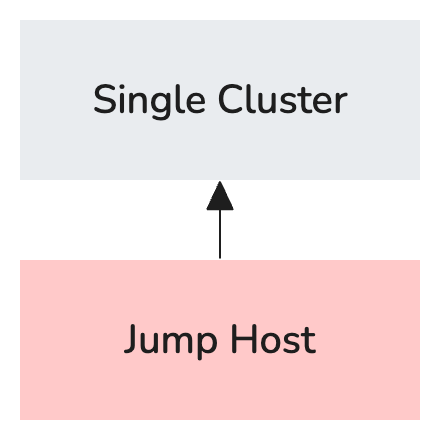
A single cluster deployment should only be used for testing purposes and is not recommended to be used in production.
Example Inventory File
---
# OpenShift Virtualization Migration Ansible Inventory

all:
  vars:

    # Baseline Variables
    aap_execution_environment: OpenShift Virtualization Migration
    aap_execution_environment_image: quay.io/redhat-cop/openshift-virtualization-migration-ee:latest
    aap_project: OpenShift Virtualization Migration
    aap_org_name: OpenShift Virtualization Migration
    aap_namespace: virtualization-migration
    aap_version: 2.6
    aap_channel: stable-2.6
    aap_instance_name: 'aap'
    aap_validate_certs: false
    controller_validate_certs: false

    # If secure_logging is set to 'true', Secrets may be displayed in logs.
    # secure_logging: false

    ## Operators to deploy on the OpenShift Hub Cluster
    # aap_seed_operator_management_hub: []
    ## Operators to deploy on the OpenShift Spoke Clusters
    # aap_seed_operator_management_spoke: []

    # Red Hat account login used to attach AAP subscription
    rh_username: changeme
    rh_password: changeme

    # Container registry vars
    # This is the location of the hosted execution environment
    container_host: changeme # e.g. 'quay.io/example'
    container_username: changeme
    container_password: changeme
    container_verify_ssl: false

    # Git Variables
    ## Configure and uncomment as needed

    ## AAP Project Configuration (repository URL and branch)
    aap_project_repo: changeme
    aap_project_branch: main

    ## Git Credentials
    git_username: changeme
    git_password: changeme
    # git_ssh_private_key:
    # git_ssh_key_passphrase:

    # Automation Hub Variables
    automation_hub_certified_url: https://cloud.redhat.com/api/automation-hub/content/published/
    automation_hub_certified_auth_url: https://sso.redhat.com/auth/realms/redhat-external/protocol/openid-connect/token
    automation_hub_certified_token: changeme

    automation_hub_validated_url: https://cloud.redhat.com/api/automation-hub/content/validated/
    automation_hub_validated_auth_url: https://sso.redhat.com/auth/realms/redhat-external/protocol/openid-connect/token
    automation_hub_validated_token: changeme


# Migration Factory Hub cluster to configure
migration_hub:
  hosts:
    # Friendly name of the Hub
    single.cluster.example.com:
      # Host Variables

      # OpenShift Variables for the Hub
      # You must only define one set of openshift credentials. EITHER
      # openshift_username + openshift_password; OR openshift_temporary_api_key OR openshift_api_key
      openshift_host: changeme # e.g. 'https://api.example.com:6443'
      # openshift_temporary_api_key: # This is a 24 hour API key generated when you select your login
      # in the OpenShift UI or use `oc login`. If a this var is not provided, it is expected that you
      # provide either openshift_username + openshift_password (used to generate a temporary api key)
      # or openshift_api_key with a permanent SA API key
      # openshift_api_key: # This is a permanent Service Account API key. If you don't have a Service
      # Account, one can be generated if you provide a tempoarary api key via openshift_temporary_api_key,
      # or if you provide openshift_username + openshift_password to generate a temporary api key for you.
      # openshift_username: # If no openshift_temporary_api_key or openshift_api_key are provided,
      # then openshift_username + openshift_password can generate one for you
      # openshift_password: # If no openshift_temporary_api_key or openshift_api_key are provided,
      # then openshift_username + openshift_password can generate one for you
      openshift_verify_ssl: false

# Migration Factory Hub spokes to configure
migration_spoke:
  hosts:
    # Friendly name of the Spoke
    single.cluster.example.com:

      # List of migration targets to configure on this specific spoke cluster
      configured_migration_targets:
        - vmware-target-1

      # Variables to apply to all configured job templates
      aap_job_template_extra_vars:

  ## Group Variables to apply to all spokes
  vars:
    migration_targets:

      ## Data Structure of Migration Targets
      # - name: vmware-target-1 # Required
      #   type: vmware # Must be `vmware`
      #   host: vcenter.example.com
      #   sdkEndpoint: /sdk # Defaults to this value if not provided
      #   username: <username>
      #   password: <password>
      #   certificate: |
      #     <certificate>
      #   insecureSkipTlsVerify: <value> # defaults to `true` if not specified
      #   credentialsSecretRef: <reference> # Namespaced name (<namespace>/<name>) or just <name> if in
      #     <mtv_namespace> containing MTV provider details
      #   nmstate: <configurations applied as merged extra variables to the job template to configure networking>
      #   mapping: <configurations applied as merged extra variables to the job template to configure MTV mapping
      #     storage and networking>

      ## Example Migration Target (uncomment to use as a baseline)
      #  - name: vmware-2w7dj
      #    type: vmware
      #    host: vcsrs00-vc.infra.demo.redhat.com
      #    username: ocpvirt-2w7dj-user1@infra
      #    password: r9F37-f6MMepF7
      #    vddk:
      #      image: quay.io/redhat-cop/openshift-virtualization-migration-vddk:latest
      #      username: "{{ container_username }}"
      #      password: "{{ container_password }}"
      #    sdkEndpoint: /sdk
      #    insecureSkipTlsVerify: true
      #    mapping:
      #      create: true
...