Configure storage and network maps
Create MTV StorageMaps and NetworkMaps so a migration plan knows how source datastores and networks land on OpenShift. Providers must already exist (Configure providers).
When you are done, both map kinds show Ready (green check) in the namespace you chose. Do not start a plan until the maps exist.
Run this from AAP. The template is OpenShift Virtualization Migration - MTV Maps (mtv_maps). The role queries the MTV inventory, then applies the CRs. It does not need source hypervisor credentials. See mtv_maps.
What the maps are for
A migration plan names one StorageMap and one NetworkMap.
-
A StorageMap maps each source datastore (or disk store) to an OpenShift StorageClass.
-
A NetworkMap maps each source network or portgroup to the pod network, a Multus NAD, or ignored.
Default names are the RFC 1123 form of <source_name>-host (destination provider name defaults to host). Default namespace is the target cluster’s mtv_namespace (usually openshift-mtv).
Prerequisites
-
Seed succeeded (Seeding Ansible Automation Platform).
-
Source and destination providers are valid (Configure providers).
-
MTV is on the destination cluster (StorageMap and NetworkMap CRDs present).
-
Inventory matches the collection layout: source hosts in
vm_sources, OpenShift hosts inmigration_clusters, and each cluster lists the sources it can migrate undervm_sources. See the inventory sample.
Required extra vars (AAP survey prompts after seed):
-
source_name— inventory host invm_sources(for examplevcenter-prod). -
target_name— inventory host inmigration_clusters(for exampleocp-prod). That host’svm_sourceslist must includesource_name.
OpenShift API access comes from K8S_AUTH_HOST / K8S_AUTH_API_KEY (AAP OpenShift credential) or from openshift_host and openshift_api_key on the target host.
Launch from AAP
After seed, AAP has OpenShift Virtualization Migration - MTV Maps.
-
In AAP, open Templates under Automation Execution.
-
Launch OpenShift Virtualization Migration - MTV Maps.
-
Survey: Source Name and Target Name (inventory host names).
-
Attach the OpenShift credential for the target cluster if the template asks for credentials.
-
Optional extra vars: the override examples below, or
mtv_maps_*_namespaceto place CRs outsideopenshift-mtv. -
Launch and wait for success.
With no overrides, the role discovers every datastore and network MTV knows for that provider pair, maps storage to the cluster default StorageClass, and maps networks to the pod network unless a NAD is annotated for auto-match.
Create only one kind of map:
mtv_maps_create_storage_maps: true
mtv_maps_create_network_maps: false
Put maps in a dedicated project (plans later live here too):
mtv_maps_storage_map_namespace: vm-migrations
mtv_maps_network_map_namespace: vm-migrations
StorageMap overrides
By default every source datastore is included and uses the destination default StorageClass (mtv_maps_default_storage_class if you set it; otherwise the class with the default annotation).
Per-datastore overrides (mtv_maps_storage_map_overrides). Do not mix include and exclude in the same list:
mtv_maps_storage_map_overrides:
  - id: datastore-12
    storageClass: ocs-storagecluster-ceph-rbd-virtualization
  - id: datastore-99
    exclude: true
Several named StorageMaps (mtv_maps_multiple_storage_maps) instead of one map. Do not set this and mtv_maps_storage_map_overrides together:
mtv_maps_multiple_storage_maps:
  gold-storage:
    - id: datastore-12
      storageClass: ocs-storagecluster-ceph-rbd-virtualization
  silver-storage:
    - id: datastore-20
      storageClass: gp3-csi
NetworkMap overrides
Resolution order for each source network:
-
Explicit override (
destination_type:pod,multus, orignored; formultussetnadasnamespace/nameorname). -
Auto-match: a NetworkAttachmentDefinition annotated with
infra.openshift-virtualization-migration/source-portgroupwhose value is the source portgroup. -
Pod network.
mtv_maps_network_map_overrides:
  - id: network-1
    destination_type: pod
  - id: network-2
    destination_type: multus
    nad: default/vm-net-prod
  - id: network-3
    destination_type: ignored
  - id: network-99
    exclude: true
Do not mix include and exclude in the same override list.
Confirm the maps
In the OpenShift web console: Migration → StorageMaps for virtualization and NetworkMaps for virtualization. Select the project where the maps were created (openshift-mtv unless you overrode the namespace). Status Ready with a green check.
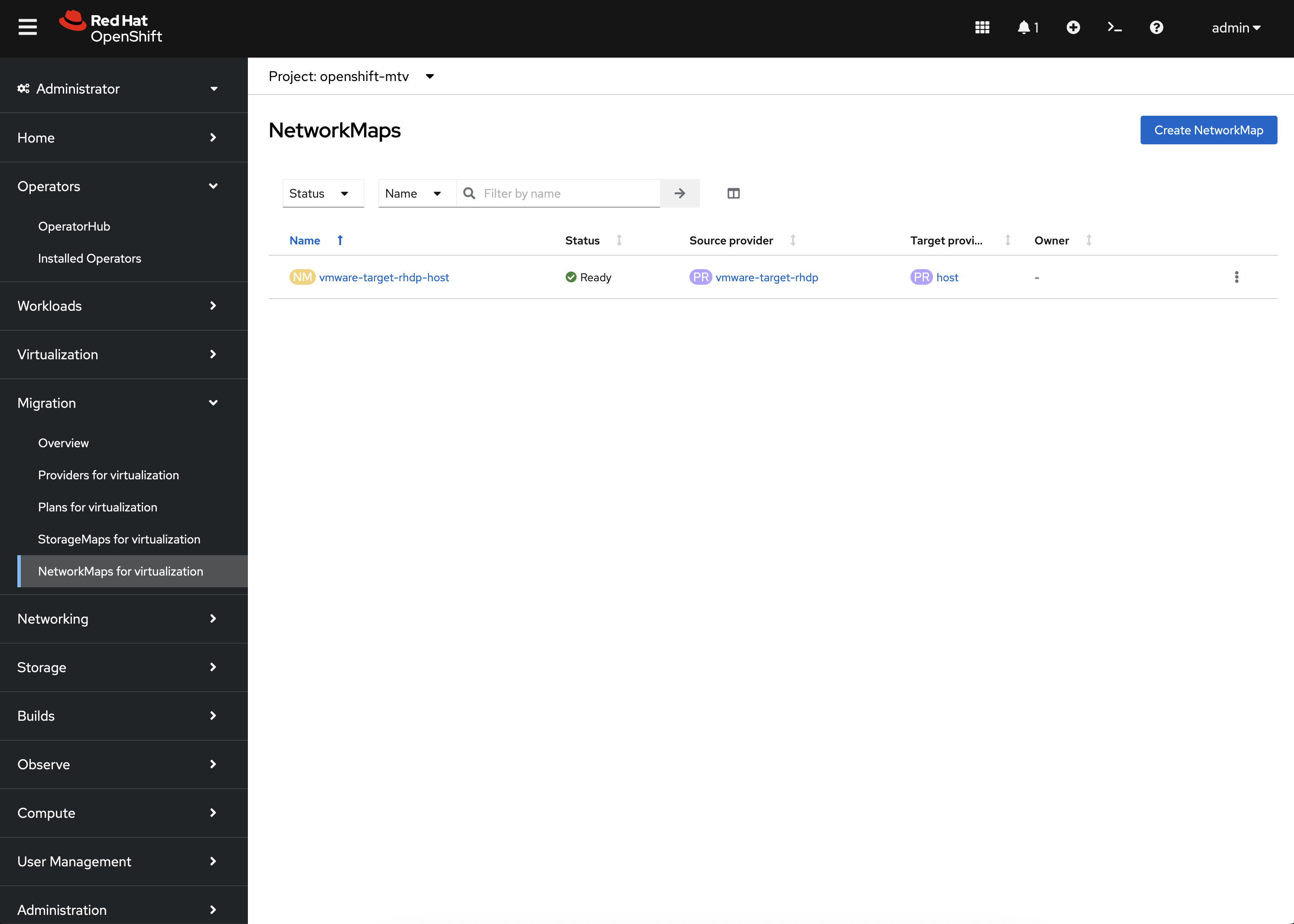
|
If the project does not appear, select Show default projects so names that start with |
Plans consume these names later (network_map / storage_map and their namespaces) in Defining a migration wave.
If map creation fails
-
source_nameortarget_namemissing, or not in inventory — use the same host names as invm_sources/migration_clusters. -
Source not in the target’s
vm_sourceslist — fix the inventory; do not invent a second playbook. -
Provider missing in MTV inventory — go back to Configure providers.
-
StorageMap or NetworkMap CRD missing — MTV is not installed; see OpenShift.
-
No default StorageClass and
mtv_maps_default_storage_classempty — set a class or mark one default on the cluster.